
MyWarehouse API v1.2 Plugin Configuration
Connect the MyWarehouse integration using the MyWarehouse API v1.2 plugin.
This guide describes the process of connecting the MyWarehouse API v1.2 plugin, configuring synchronization parameters, verifying product updates, and monitoring integration status in Tec.Delivery.
Required Information
Before connecting the plugin, prepare the authorization token obtained from your MyWarehouse account.
| Parameter | Description | Example |
|---|---|---|
| Token | Authorization token used to access the MyWarehouse API. | eyJhbGciOiJIUzI1Ni... |
| Original Language | The language used for product content in MyWarehouse. | Russian |
| Sync period, hours | Automatic synchronization interval in hours. | 1 |
Selecting the Plugin
Open the merchant's plugin section in the Tec.Delivery administration panel.
Click the button to add a new plugin.
Select MyWarehouse API v1.2 from the drop-down list to configure product and inventory synchronization from MyWarehouse.
Configuring Connection Parameters
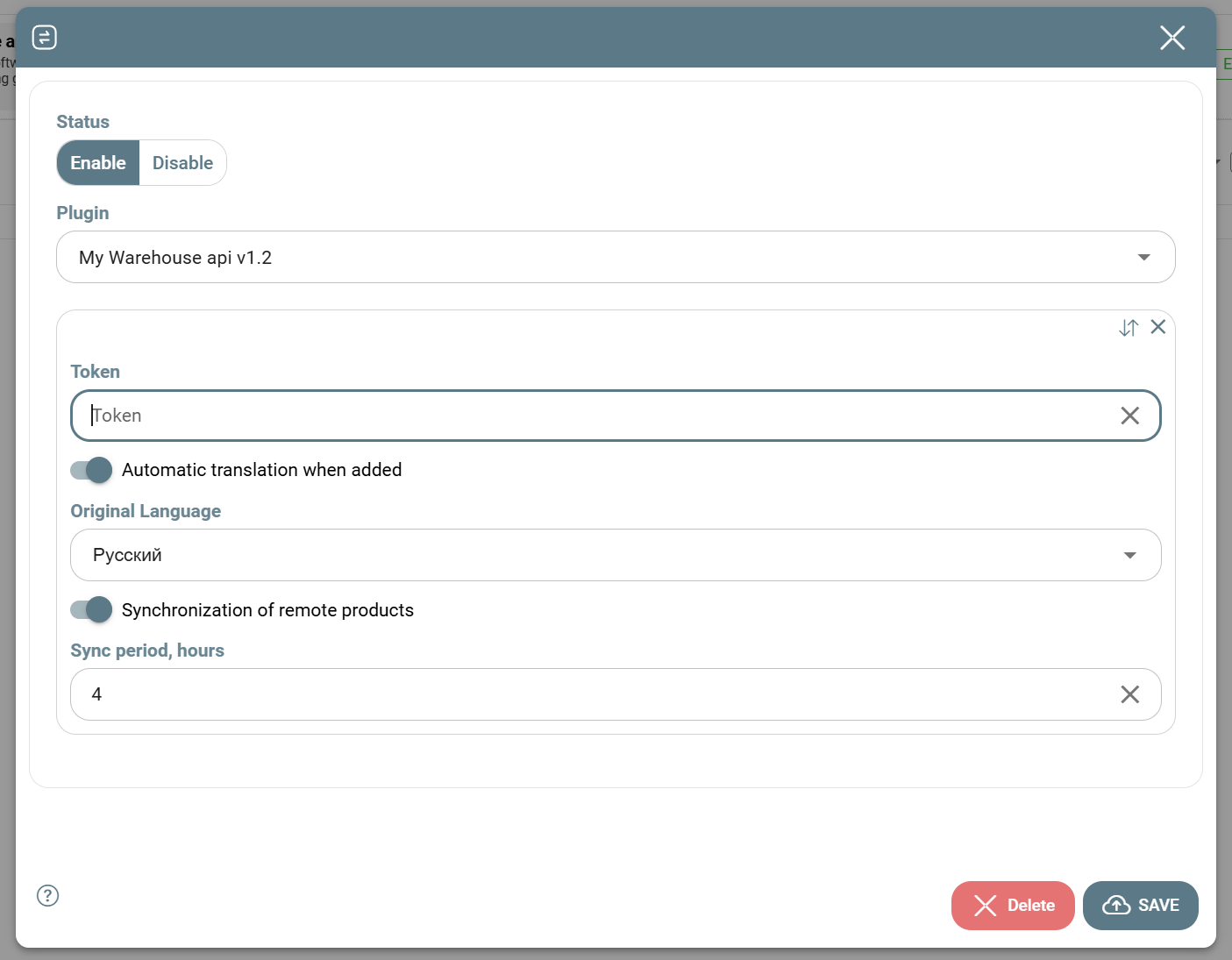
Fill in the connection settings and synchronization rules.
| Parameter | Description | Example |
|---|---|---|
| Token | Authorization token obtained from your MyWarehouse account. | eyJhbGciOiJIUzI1Ni... |
| Automatic translation when added | Enables automatic translation of product names and descriptions into languages activated in the Tec.Delivery company profile. | Enabled |
| Original Language | The original language of product content stored in MyWarehouse. | Russian |
| Sync period, hours | Interval between automatic synchronizations. The minimum value is 1 hour. | 1 |
| Status | Plugin operating status. | Enable |
For regular product updates, set Sync period, hours = 4 and Status = Enable. After saving, the plugin will perform synchronization automatically.
Verifying the Synchronization Table
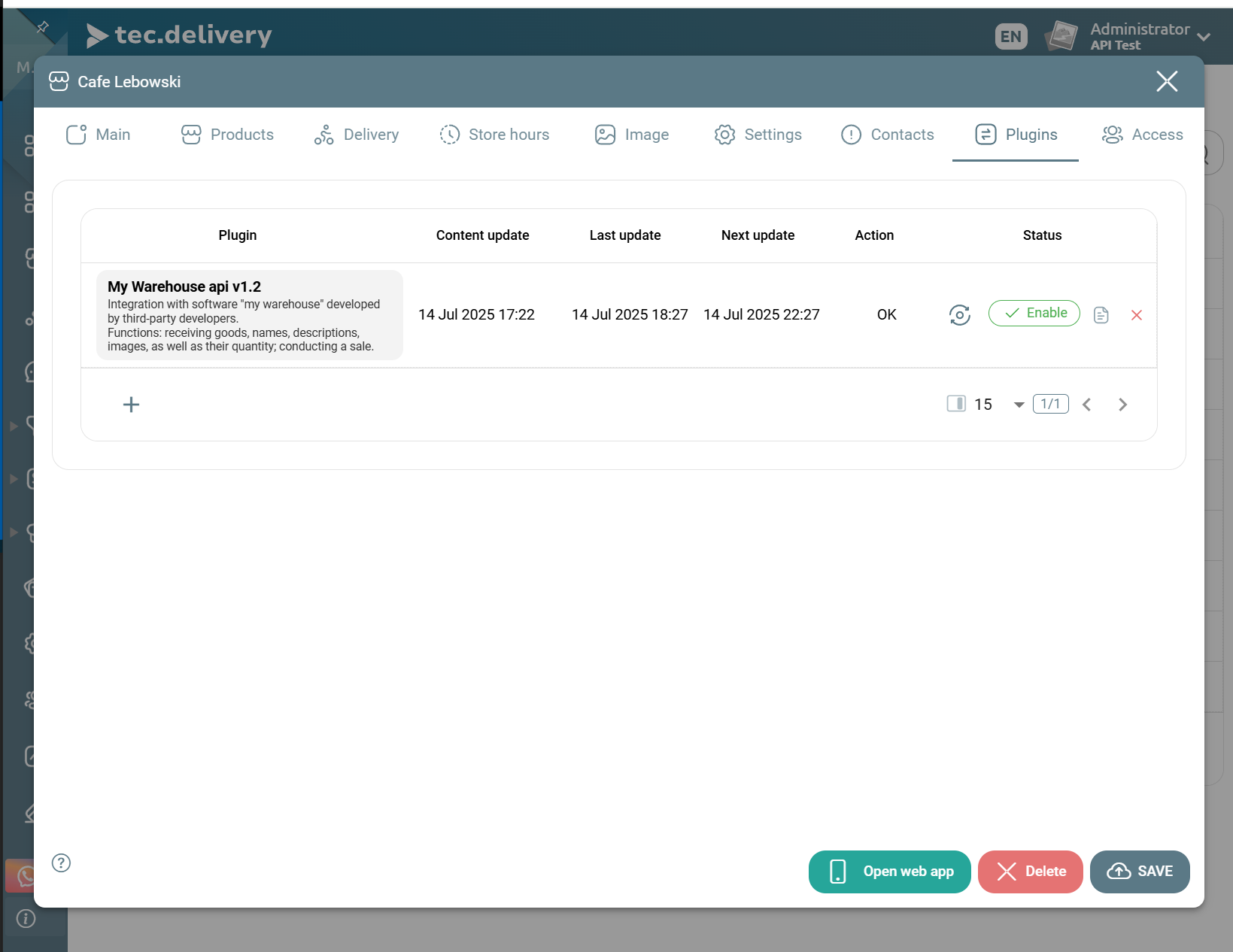
After connecting the plugin, the integration table will display information about the last update and the next scheduled synchronization.
| Field | Description | Example |
|---|---|---|
| Content update | Date and time of the most recent content update, including product names, descriptions, and images. | 2026-06-07 14:30 |
| Last update | Date and time of the most recent inventory and product data update. | 2026-06-07 15:00 |
| Next update | Date and time of the next scheduled synchronization. | 2026-06-07 16:00 |
| Last status | Latest synchronization execution status. | Success |
Verifying Products in the Catalog
Open the merchant product catalog and verify that products imported from MyWarehouse are displayed correctly.
| What to Check | Description | Expected Result |
|---|---|---|
| Product Name | The product name should match the data in MyWarehouse. | Milk 1 L |
| Product Description | The description should be imported or translated if automatic translation is enabled. | The product description is displayed on the product page. |
| Inventory Level | The quantity should match the inventory value in MyWarehouse. | 25 |
| Image | The image should be uploaded if available in the source system. | The product image is displayed correctly. |
Important Synchronization Details
| Situation | Cause | Solution |
|---|---|---|
| Products are not loading | Invalid or expired token. | Verify the token in your MyWarehouse account and update it in the plugin settings. |
| Inventory levels are not updating | Synchronization is disabled or the next synchronization time has not yet been reached. | Check the Status field and the Next update field. |
Final Checklist
- A valid MyWarehouse API access token has been obtained.
- The Merchant → [Merchant Name] → Plugins section has been opened.
- The MyWarehouse API v1.2 plugin has been selected.
- Connection parameters have been completed.
- The Original Language has been specified.
- The synchronization interval has been configured.
- The Synchronization of remote products option has been reviewed.
- The plugin has been saved and enabled.
- The Content update, Last update, and Next update fields have been verified.
- Product display has been checked in the Tec.Delivery catalog.